Duplicate contacts are one of the most common data quality problems in any CRM system. They usually appear over time through manual data entry, imports, website forms, API integrations, or multiple employees creating records independently.
Although a duplicate contact may look like a small issue, it creates bigger business problems. Customer history becomes split across multiple records, reports become inaccurate, and sales teams often contact the same customer more than once.
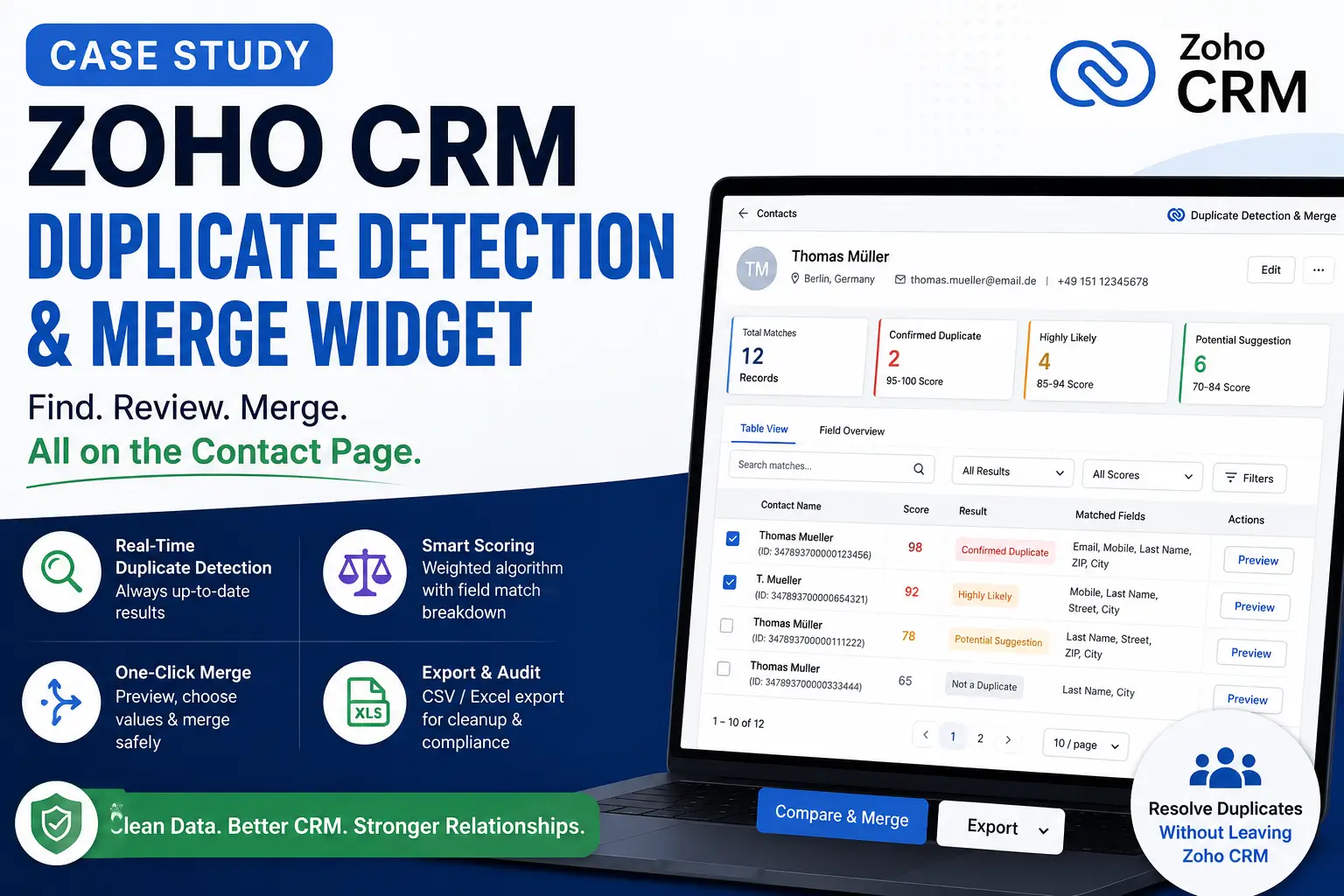
In this case study, we explain how we replaced a traditional automation-based duplicate checking process with a real-time Zoho CRM widget that detects duplicate contacts instantly, explains why records match, and allows users to merge them without leaving the contact page.
About the Client
The client uses Zoho CRM for managing customer contacts in the German market.
Their CRM contains localized contact fields such as:
- Mobile
- Street
- City
- Zip
As the CRM continued to grow, duplicate contacts became a regular operational problem.
Business Challenges
The client already had a duplicate detection system built using Zoho Deluge.
The automation worked like this:
- Search possible duplicate contacts using COQL.
- Calculate a duplicate score.
- Generate a file containing the analysis.
- Upload the file to the CRM record.
- Update duplicate-related fields inside the contact.
While the system successfully identified possible duplicates, it introduced several new problems.
Duplicate analysis became outdated
The duplicate report only reflected the CRM state when the automation last ran.
If someone updated or created a contact afterward, the report immediately became outdated.
CRM records became cluttered
Every duplicate analysis created additional attachments and updated multiple custom fields such as:
- File_ID
- Highest_Duplicate_Score
- Total_Duplicate_Records
- Status
These fields existed only to support the duplicate process and added unnecessary noise to contact records.
Users could not resolve duplicates
The automation only reported duplicate records.
Users still had to manually search, compare, edit, and delete contacts themselves.
Detection and resolution were completely separate tasks.
Limited transparency
Although each duplicate received a score, users could not understand why two contacts matched.
Without visible scoring logic, confidence in the results was limited.
Project Requirements
The client wanted a solution that could:
- Detect duplicate contacts in real time
- Always use the latest CRM data
- Avoid creating additional CRM records or files
- Explain why records were considered duplicates
- Allow users to merge duplicate contacts directly from the Contact page
- Keep the interface simple enough for everyday CRM users
Our Analysis
Instead of improving the existing Deluge automation, we redesigned the entire workflow.
The main objective was simple:
Duplicate detection should become an interactive tool instead of a background automation.
That decision changed the architecture completely.
Rather than storing analysis results inside Zoho CRM, the widget would calculate everything every time the user opened a contact.
This ensured that every duplicate check reflected the latest CRM data.
Solution Overview
We developed a Zoho CRM Related List Widget that appears directly inside each Contact record.
The widget performs duplicate analysis in real time and presents the results immediately.
Unlike the previous implementation, the widget does not modify any CRM data during analysis.
It simply reads existing records, performs calculations, and displays the results.
Only when the user decides to merge contacts does the widget update the CRM.
Solution Architecture
The workflow follows a simple sequence.
Open Contact

↓

Load Current Contact

↓

Search Candidate Contacts using COQL

↓

Calculate Duplicate Scores

↓

Display Ranked Duplicate List

↓

Preview Merge

↓

Update Master Record

↓

(Optional) Delete Duplicate Records

↓

Refresh Results
Live Duplicate Detection
Whenever the widget opens, it automatically:
- Reads the current contact
- Builds a COQL query using available matching fields
- Retrieves candidate contacts
- Scores every possible duplicate inside the browser
- Displays ranked results immediately
Because the calculation runs live, users always see current CRM information.
No scheduled jobs are required.
No cached files are used.
Weighted Duplicate Scoring
One of the biggest improvements was replacing the previous “mystery score” with a transparent scoring system.
Every field contributes a predefined weight.
| Field | Exact Match | Partial Match |
|---|---|---|
| 35 | — | |
| Mobile | 25 | — |
| Phone | 15 | — |
| Last Name | 10 | 6 |
| First Name | 5 | 3 |
| Street | 5 | 3 |
| ZIP | 3 | — |
| City | 2 | 1 |
Instead of showing only a percentage, the widget also displays which fields matched.
Users immediately understand why a record received its score.
Easy-to-Understand Match Levels
Scores are grouped into business-friendly categories.
| Score | Result |
|---|---|
| 95–100 | Confirmed Duplicate |
| 85–94 | Highly Likely |
| 70–84 | Potential Suggestion |
| Below 70 | Not a Duplicate |
This removes guesswork from the review process.
Contact Merge (Combine)
Finding duplicates solves only half the problem.
Users also need a safe way to remove them.
Since Zoho CRM does not provide a merge API suitable for this workflow, we built our own merge process inside the widget.
The merge process includes:
- Selecting one or more duplicate records
- Viewing a side-by-side comparison
- Choosing the preferred values
- Updating the master record
- Optionally deleting duplicate records
The widget refreshes automatically after the merge so the duplicate list stays accurate.
Safe Merge Process
Data integrity was a major priority.
The merge engine automatically ignores fields that should never be overwritten, including:
- Read-only fields
- Formula fields
- Rollup fields
- Lookup fields
- System-managed fields
When multiple duplicate records contain different values, the widget chooses the value from the highest-scoring duplicate by default.
Users can also manually select which record should provide a particular field value.
Before deleting duplicate records, the widget clearly warns users that deletion is permanent and related records are not transferred automatically.
This keeps destructive actions intentional rather than accidental.
User Experience Features
The project included much more than duplicate detection.
The widget provides a complete workspace for CRM data cleanup.
Features include:
- Summary dashboard
- Duplicate statistics
- Table view
- Field comparison view
- Global search
- Score filters
- Sorting
- Pagination
- Show or hide columns
- CSV export
- Excel export
- Current page export
- Filtered export
- Full export
- Page-level multi-selection
- Bulk merge
- Saved user preferences
- Contact-specific filter state
Users can comfortably review hundreds of duplicate records without leaving the CRM.
Technical Highlights
Several engineering decisions helped make the solution reliable and scalable.
Live Algorithm Port
The duplicate scoring logic was migrated directly from the existing Deluge automation into JavaScript.
This preserved the business rules users already trusted while eliminating unnecessary CRM updates.
Handling COQL Limitations
Zoho COQL has practical limitations.
To support large datasets, the widget:
- Retrieves records in batches of 200
- Continues loading while
more_recordsis available - Stops gracefully when no additional records exist
- Uses nested OR conditions to satisfy COQL query requirements
This allows the widget to scale without changing the user experience.
Modular Architecture
Instead of building one large JavaScript file, the widget was divided into focused modules.
Examples include:
- Zoho initialization
- Application bootstrap
- Duplicate engine
- Merge engine
- Rendering
- State management
- Export module
- Summary module
- UI controls
This modular structure simplifies future maintenance and feature development.
Business Benefits
The new widget changed duplicate management from a reporting process into an active cleanup workflow.
The client now benefits from:
Always Current Results
Every analysis runs against live CRM data.
No scheduled jobs or outdated reports.
Cleaner CRM
Duplicate analysis no longer creates files or updates helper fields.
CRM records stay clean.
Faster Resolution
Users can detect and merge duplicates in one screen.
No switching between multiple pages.
Better User Confidence
Visible scoring rules help users understand every recommendation.
The matching process is transparent.
Safer Data Cleanup
Preview screens, field selection, and confirmation dialogs reduce the risk of accidental data loss.
Improved Productivity
Bulk selection and batch merge significantly reduce the time required for large cleanup projects.
Estimated Outcomes
Although exact business metrics remain confidential, the solution is expected to provide:
- Reduced duplicate contact records
- Faster duplicate review process
- Improved CRM reporting accuracy
- Better customer communication
- Less manual effort during data cleanup
- Higher confidence in CRM data quality
Future Enhancements
Potential improvements include:
- Automatic duplicate suggestions during contact creation
- Background duplicate monitoring
- Configurable scoring weights
- Organization-wide duplicate dashboards
- Duplicate detection across Leads, Contacts, and Accounts
- AI-assisted field recommendations during merges
Conclusion
This project demonstrates that duplicate management should be more than a scheduled background automation.
By moving duplicate detection into a real-time Zoho CRM widget, the client now has a solution that is always current, easy to understand, and practical to use.
Instead of producing reports that users must interpret later, the widget enables them to identify duplicates, review the evidence, merge records safely, and immediately see the updated results.
The result is a cleaner CRM, better data quality, and a much simpler workflow for maintaining accurate customer records.
FAQs
Why not use a scheduled Deluge automation?
Scheduled automations generate results that can quickly become outdated. Running the analysis when a user opens a contact ensures the latest CRM data is always used.
Does the widget modify CRM data during duplicate analysis?
No. The widget only reads CRM data while performing duplicate detection. Records are updated only when a user explicitly confirms a merge.
How are duplicate scores calculated?
Each matching field contributes a predefined weight. Exact matches receive higher scores, while selected fields also support partial matches.
Can users review field differences before merging?
Yes. The widget provides a side-by-side preview so users can compare records and choose which values should be retained.
Is the merge process safe?
Yes. System fields, read-only fields, lookup fields, formula fields, and rollup fields are automatically excluded. Users also receive a confirmation warning before any duplicate records are deleted.