Many businesses still spend a lot of time entering customer information into their CRM systems manually. When customer data comes from PDF contracts, application forms, or scanned documents, employees often need to read each document and copy the information into Zoho CRM field by field.
This process is slow, repetitive, and increases the chances of typing mistakes.
A telecom company wanted a better way to handle this workflow. Instead of manually copying data from customer documents, they needed a solution that could read uploaded PDF files, extract the required information automatically, and allow employees to review the results before saving them into Zoho CRM.
To solve this challenge, our team at A1 Zoho Solutions developed a custom Zoho CRM Widget that combines OCR, AI-based data extraction, and Zoho CRM APIs into a single workflow.
About the Client
The client is a telecom service provider based in Switzerland. Their sales and customer onboarding teams process a large number of customer documents every day.
Each customer submission includes PDF files containing personal details, contact information, addresses, identification numbers, and service-related information that must be entered into Zoho CRM.
Because these documents arrived in different formats, manual data entry had become one of the most time-consuming tasks for the team.
Business Challenges
The client faced several operational challenges:
- Employees manually copied information from PDF documents.
- Data entry took several minutes for every customer.
- Typing mistakes created duplicate work and incorrect CRM records.
- Different document layouts made the process inconsistent.
- Large numbers of daily submissions reduced team productivity.
- Existing OCR tools were not integrated directly with Zoho CRM.
The client wanted an integrated solution that worked entirely inside Zoho CRM without requiring employees to switch between multiple applications.
Requirements
The client wanted a solution that could:
- Work directly inside Zoho CRM.
- Allow users to upload PDF documents.
- Read both digital and scanned PDF files.
- Extract customer information automatically.
- Map extracted values to CRM fields.
- Allow users to edit extracted information before saving.
- Create CRM records through Zoho CRM APIs.
- Reduce manual work while maintaining data accuracy.
Our Analysis
After reviewing the client’s workflow, we found that the biggest delay was not document storage but manual transcription.
The workflow consisted of three major steps:
- Upload the customer document.
- Read and extract customer information.
- Enter the extracted information into Zoho CRM.
Instead of asking employees to complete the third step manually, we decided to automate it.
Since document formats varied significantly, traditional template-based OCR was not suitable. We designed a flexible workflow using OCR and AI so the system could understand different document layouts while still returning structured data.
Solution
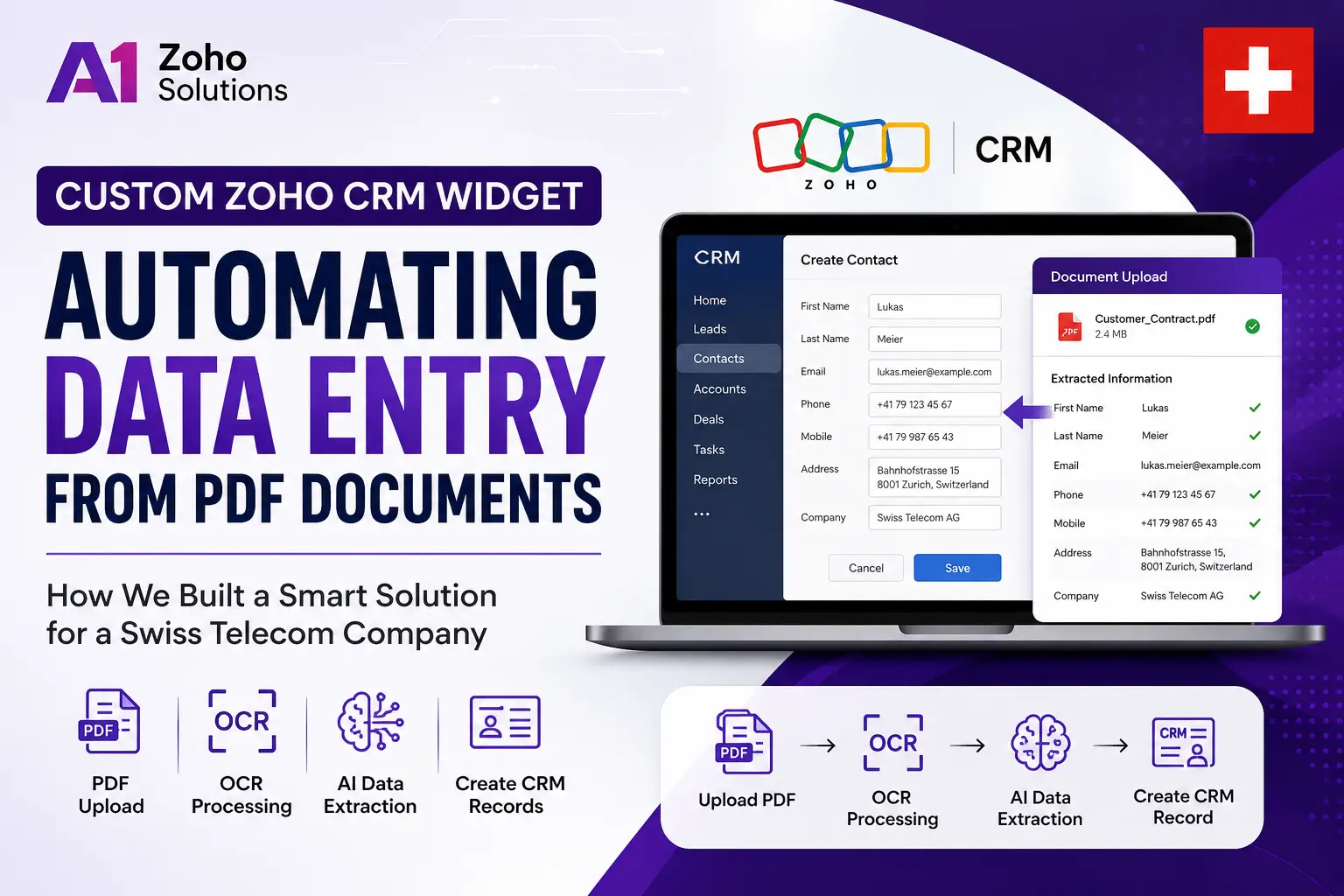
We developed a custom Zoho CRM Widget that runs directly inside the CRM interface.
The workflow is simple:
- The user uploads a PDF document.
- The widget sends the file for OCR processing.
- OCR converts the document into readable text.
- AI analyzes the extracted text and identifies customer information.
- The widget automatically fills the corresponding CRM fields.
- The user reviews or edits the values if required.
- The data is saved into Zoho CRM through CRM APIs.
This reduced manual typing while still allowing employees to verify the information before creating the record.
Architecture Overview
User
   │
   ▼
Zoho CRM Widget
   │
   ▼
PDF Upload
   │
   ▼
OCR Service
   │
   ▼
AI Data Extraction
   │
   ▼
Structured JSON
   │
   ▼
Field Mapping
   │
   ▼
Zoho CRM API
   │
   ▼
Customer Record Created
Features Implemented
Custom Zoho CRM Widget
A custom widget embedded inside Zoho CRM so employees never leave the CRM interface.
PDF Upload
Users can upload customer documents directly from the widget.
OCR Processing
The system extracts text from both digital PDFs and scanned documents.
AI-Based Data Extraction
Instead of searching for fixed keywords, AI identifies customer information from different document formats.
Automatic Field Mapping
Extracted values are automatically matched with Zoho CRM fields.
Manual Review
Employees can edit any extracted value before saving the record.
CRM Record Creation
Validated data is sent directly to Zoho CRM using CRM APIs.
Error Handling
The widget highlights missing or uncertain values for manual verification.
Technologies Used
- Zoho CRM Widgets
- Zoho CRM REST APIs
- JavaScript
- HTML
- CSS
- OCR Engine
- AI-based Document Processing
- REST APIs
Automation Workflow
Customer PDF
        │
        ▼
Upload inside CRM Widget
        │
        ▼
OCR Processing
        │
        ▼
AI Extracts Customer Details
        │
        ▼
Populate CRM Fields
        │
        ▼
User Reviews Data
        │
        ▼
Save into Zoho CRM
Security Considerations
Since customer documents contain sensitive information, security was an important part of the implementation.
The solution was designed to:
- Process uploaded documents securely.
- Transfer data through authenticated APIs.
- Allow only authorized CRM users to access the widget.
- Avoid unnecessary storage of customer documents.
- Keep customer information within the organization’s CRM workflow.
Business Benefits
After implementation, the client achieved several improvements:
- Significantly reduced manual data entry.
- Faster customer onboarding.
- Improved data consistency.
- Fewer typing mistakes.
- Better employee productivity.
- Standardized customer record creation.
- Reduced repetitive administrative work.
- Improved user experience inside Zoho CRM.
Estimated Outcomes
The exact numbers depend on document complexity and business volume, but similar implementations typically help businesses:
- Reduce manual data entry time by 70–90%.
- Improve CRM data accuracy.
- Handle higher document volumes with the same team.
- Create customer records much faster.
Future Enhancements
The solution can be expanded further with features such as:
- Support for additional document types.
- Automatic duplicate detection before record creation.
- Confidence scoring for extracted values.
- Multi-language document processing.
- Integration with Zoho Sign.
- Workflow automation after successful record creation.
- Bulk document processing.
- Attachment storage inside Zoho WorkDrive.
Conclusion
Manual data entry from customer documents slows down business operations and increases the risk of errors.
By developing a custom Zoho CRM Widget with OCR and AI-based document extraction, A1 Zoho Solutions helped a telecom company automate one of its most repetitive daily tasks. Employees now upload a document, review the extracted information, and create CRM records in a fraction of the time previously required.
The solution demonstrates how custom Zoho CRM development can simplify complex business processes while keeping users inside a familiar CRM environment.
FAQs
Can this widget work with scanned PDF documents?
Yes. The solution supports OCR, allowing it to extract text from scanned documents as well as digital PDFs.
Does AI automatically create CRM records?
No. The extracted data is shown to the user first, allowing them to review or edit the information before saving.
Can the widget support different document layouts?
Yes. AI-based extraction makes it possible to handle multiple document formats without relying on fixed templates.
Can this solution be customized for other industries?
Yes. Similar solutions can be built for insurance, healthcare, legal firms, finance, logistics, manufacturing, and any business that receives customer documents in PDF format.
Can it integrate with other Zoho applications?
Yes. Depending on business requirements, it can integrate with Zoho Creator, Zoho Books, Zoho Desk, Zoho Sign, Zoho WorkDrive, and other third-party systems.