If you run a small or mid-size business, you already know this problem. Your team is checking Instagram DMs on one phone, replying to Facebook comments on a laptop, managing WhatsApp chats on someone’s personal number, and writing down leads on a spreadsheet, if they write them down at all.
Nothing is connected. A customer messages you on Instagram, then follows up on WhatsApp, and by the time they call your sales number, nobody in your team knows this is the same person who was already talking to you for three days.
This is a very common question we get from business owners: “I want one system where social media, leads, and WhatsApp all come together. Which Zoho tools do I need?”
This article answers that question in detail. We will explain each of your three requirements one by one, tell you exactly which Zoho product solves it, show you how these products talk to each other, and explain how to actually get started.
Understanding the Three Requirements
Before jumping to the solution, let us break down what you actually need, because each requirement is solving a different business problem.
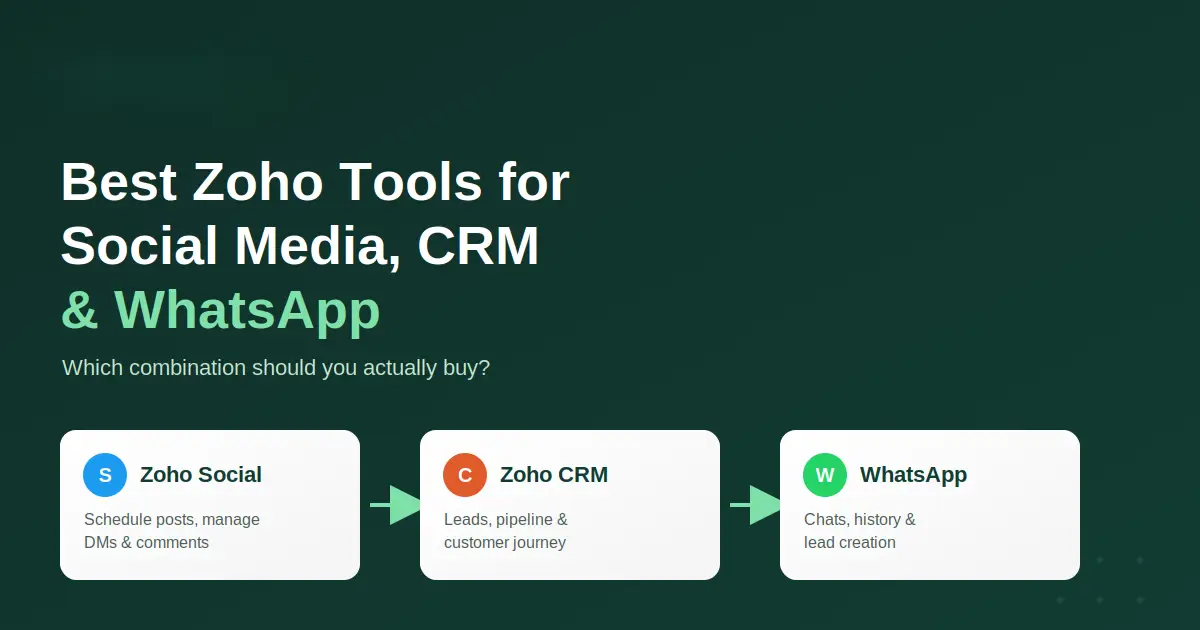
Requirement 1: Social media management – You want to schedule posts, reply to comments, and answer DMs across Facebook, Instagram, and LinkedIn, all from one place, instead of switching between four different apps.
Requirement 2: CRM and lead management – When someone shows interest through a comment, DM, or inquiry, that interest should not disappear. It should become a lead, get assigned to the right person, and stay tracked until it becomes a sale or gets closed.
Requirement 3: WhatsApp integration – Your team should be able to send and receive WhatsApp messages from within your business system, with the full chat history saved against the customer record, not lost inside someone’s personal phone.
The good news is that Zoho already has a product built for each of these needs, and they are designed to work together.
Zoho Social: For Social Media Management
Zoho Social is Zoho’s dedicated tool for managing social media accounts. It lets you plan and publish posts across Facebook, Instagram, LinkedIn, X, and a few other platforms, all from one calendar.
Beyond just posting, Zoho Social also gives you:
- A unified inbox where all comments, mentions, and direct messages from your connected channels land in one place, so your team is not opening four separate apps to check messages.
- SmartQ, a feature that suggests the best time to post based on when your audience is actually active.
- Basic analytics to see which posts and channels are actually bringing engagement.
- Team collaboration, so more than one person can manage the same social accounts without messages getting missed or duplicated.
For a business handling Facebook, Instagram, and LinkedIn together, Zoho Social is built exactly for this job. It is not trying to be a CRM or a messaging tool. It focuses on doing social media well.
Zoho CRM: For Lead Management and Customer Journey
Zoho CRM is where the actual business tracking happens. Once someone shows interest, whether through a social comment, a website form, a phone call, or a WhatsApp message, Zoho CRM is the place that record should live.
Zoho CRM lets you:
- Automatically create a lead the moment someone interacts with you on a connected channel, instead of your team typing it in manually.
- Assign leads to the right salesperson based on rules you set, like location, product interest, or lead source.
- Track the full journey from lead to deal to customer, so anyone on your team can open a record and see the complete history.
- Send automated follow-up reminders so leads do not go cold just because someone forgot to call back.
- Pull reports showing which channel is actually generating business for you.
Without a CRM, social media interest and WhatsApp conversations stay scattered. With Zoho CRM sitting at the centre, everything connects to one customer record.
WhatsApp Integration: Bringing Conversations Into Your System
This is usually the part businesses get confused about, so let us go slow here.
To connect a real business WhatsApp number to any CRM, including Zoho CRM, you need what is called the WhatsApp Business API, now officially called the WhatsApp Cloud API. This is different from the regular WhatsApp Business app you might already be using on your phone. The regular app cannot be connected to a CRM. The Cloud API can.
Getting this set up involves an approval process from Meta (the company that owns WhatsApp), and this is one part where working with an implementation partner genuinely saves time, because the approval and setup steps are technical and easy to get wrong the first time.
Once your WhatsApp Business number is connected to Zoho CRM (this feature is available on Zoho CRM’s Enterprise and Ultimate plans, and comes included in Zoho One), your team gets:
- WhatsApp messages arriving directly inside Zoho CRM’s SalesInbox, alongside your other communication channels.
- Automatic lead or contact creation when a new number messages you.
- Full chat history saved permanently against the customer record, so if a rep leaves the company, the conversation history does not leave with them.
- The ability to reply to WhatsApp messages from within Zoho CRM itself, without opening WhatsApp separately.
One honest point here: setting up WhatsApp Business API does take a few working days because of Meta’s approval process, and depending on your industry, template messages (the pre-written messages you send for things like order confirmations) also need approval. This is normal for any CRM-WhatsApp setup, not specific to Zoho.
Why Zoho One Makes Sense for This Setup
Now, here is the real question. Should you buy Zoho Social and Zoho CRM separately, or go with Zoho One, which is Zoho’s all-in-one bundle covering more than 45 applications?
For a business with exactly this requirement (social media plus CRM plus WhatsApp), Zoho One works out better for a few clear reasons:
1. WhatsApp integration needs a higher CRM plan anyway. Since native WhatsApp integration inside Zoho CRM requires the Enterprise or Ultimate plan, you are already paying for a higher tier of CRM. At that point, the price gap between “Zoho CRM Enterprise + Zoho Social” and “Zoho One” becomes small, while Zoho One gives you dozens of extra tools you will likely need later.
2. You get room to grow without buying more software. Most businesses that start with social media and CRM soon need invoicing (Zoho Books), a helpdesk (Zoho Desk), or a way to send forms and surveys (Zoho Forms). Zoho One already includes all of these, so you are not going shopping for new tools every few months.
3. One login, one billing, one admin panel. Managing separate subscriptions for Zoho Social and Zoho CRM means separate billing dates, separate user management, and separate support tickets. Zoho One brings this under a single admin console, which matters a lot once your team grows past 5-6 people.
4. Employee licensing is simpler. Zoho One is generally priced per employee, so every employee in your company gets access to the full suite, not just the two or three apps you originally bought.
That said, Zoho One is not automatically the right choice for every business. If you are a very small team of 1-2 people who genuinely only need social media posting and nothing else, buying Zoho Social alone is cheaper. The bundle makes sense once your requirement already includes CRM at the Enterprise level, which is exactly the case here because of the WhatsApp requirement.
Zoho One vs Buying Individual Applications
| Factor | Zoho One (Bundle) | Individual Apps |
|---|---|---|
| Apps included | 45+ apps, including CRM, Social, Books, Desk, Forms, and more | Only the apps you purchase |
| Billing | Single monthly/yearly bill | Separate bill for each app |
| Admin management | One admin console for all apps and users | Separate admin panel per app |
| WhatsApp on CRM | Included (since CRM Enterprise/Ultimate features are part of the bundle) | Needs CRM Enterprise or Ultimate plan separately |
| Future scaling | New department needs a tool? Already included | Needs a new purchase and new integration setup |
| Best suited for | Businesses expecting to use 3 or more Zoho apps, or planning to grow | Businesses that need only 1-2 specific apps long-term |
How Zoho Social and Zoho CRM Work Together
Once both are connected, here is what actually happens in daily use:
- A prospective customer comments on your Instagram post asking about pricing.
- Zoho Social’s unified inbox shows this comment to your social media person, who can reply directly from Zoho Social.
- Based on rules you set up (for example, any comment containing “price” or “interested”), that interaction gets pushed as a new lead into Zoho CRM.
- The lead lands in CRM with the source marked as “Instagram”, so your reports later show exactly how many leads came from each channel.
- A workflow rule in CRM assigns this lead automatically to the right sales rep, based on your assignment logic.
- The sales rep gets a notification and follows up, either by call, email, or WhatsApp, all logged against the same customer record.
This removes the manual step of someone copying details from social media into a spreadsheet, which is where most leads get lost in small businesses.
How WhatsApp Fits Into the Same Flow
Now add WhatsApp into this same picture. Say the same customer, after commenting on Instagram, later messages your WhatsApp Business number directly.
Because their number is already associated with a CRM record (or gets matched automatically), the WhatsApp conversation lands against the same lead, not a new one. Your sales rep can see the Instagram comment, the WhatsApp chat, and any email conversation, all on a single screen.
This is the real value of connecting these three systems. It is not about having fancy software. It is about not losing track of a customer who talks to you across different channels, which happens all the time in real business.
Automation Possibilities Worth Setting Up
Once your systems are connected, a few automations are worth setting up early, because they save real time every single day:
- Lead assignment rules – automatically assign leads based on product interest, city, or which sales rep is free.
- Auto-notifications – alert the right person the moment a high-value lead comes in from social media or WhatsApp, instead of waiting for someone to check manually.
- Follow-up reminders – if a lead has not been contacted within a set number of hours, the system nudges the rep automatically.
- Reporting dashboards – a weekly or monthly report showing how many leads came from Facebook, Instagram, LinkedIn, and WhatsApp, and how many actually converted.
- WhatsApp template automation – for repeat actions like order confirmation or appointment reminders, using pre-approved templates instead of typing the same message every time.
None of these need to be built on day one. Most businesses start with basic lead capture and add automations gradually as they understand their own workflow better.
Recommended Solution
Based on the three requirements you shared, here is the setup we would recommend:
Go with Zoho One, specifically because your WhatsApp requirement already pushes you to Zoho CRM’s Enterprise-level features, and Zoho One gives you that plus Zoho Social plus everything else your business will likely need over the next year or two, at a combined cost that is usually close to, or better than, buying CRM Enterprise and Social separately.
Inside Zoho One, the specific setup would be:
- Zoho Social – connected to your Facebook, Instagram, and LinkedIn accounts, with unified inbox and comment/DM management turned on.
- Zoho CRM (Enterprise-level features via Zoho One) – set up with lead capture rules from Zoho Social, assignment workflows, and reporting dashboards.
- WhatsApp Business API connected to Zoho CRM – through Meta’s approval process, so WhatsApp chats, lead creation, and chat history all sit inside CRM.
If your business is very small (1-2 people, no separate sales team) and you genuinely do not need the other Zoho One apps right now, a lighter starting point of Zoho CRM Enterprise plus Zoho Social is also workable, and you can move to Zoho One later as you grow.
How to Get Started
Getting this set up properly involves a few steps, and doing them in the right order saves a lot of rework later.
Step 1: Confirm your requirement and user count. Decide how many employees will need access, since Zoho One and Zoho CRM are both priced per user.
Step 2: Purchase the right subscription. Zoho One and Zoho CRM plans can be purchased directly from Zoho’s website, or through a Zoho partner, who can also advise on annual versus monthly billing, which affects pricing.
Step 3: Set up WhatsApp Business API. This needs a Meta Business account, a phone number not currently active on regular WhatsApp, and approval from Meta. This step usually takes a few working days.
Step 4: Connect your accounts. Link your Facebook, Instagram, and LinkedIn pages to Zoho Social, and connect your approved WhatsApp number to Zoho CRM.
Step 5: Set up lead capture and assignment rules. Decide how social interactions become leads, and how those leads get assigned to your team.
Step 6: Migrate existing data, if any. If you already have leads or customer data in a spreadsheet or another system, this needs to be cleaned and imported correctly, so you do not start with duplicate or messy records.
Step 7: Train your team. The tools only help if your team actually uses them daily. A short training session on the unified inbox, lead handling, and WhatsApp replies goes a long way.
This is exactly where A1 Zoho Solutions can help. We handle the full process end to end, from consultation on the right Zoho plan for your business, to setting up Zoho Social and Zoho CRM, connecting your WhatsApp Business API, migrating your existing customer data, building the automation workflows you need, and training your team so the system is actually used, not just switched on and forgotten. We also provide ongoing support once your system is live, in case something needs adjusting as your business grows.
Conclusion
For a business wanting social media management, CRM-based lead tracking, and WhatsApp communication all connected together, the combination of Zoho Social, Zoho CRM, and WhatsApp Business API integration solves all three requirements, and Zoho One is usually the most practical way to get there, since it bundles these tools along with room to grow.
The technology part is only half the job though. The setup, the automation rules, and the team training are what actually decide whether this system saves you time or just becomes another unused tool. That part is where getting help from a Zoho implementation partner is worth it.
Comparison Table (Standalone)
| Business Requirement | Recommended Zoho Product |
|---|---|
| Scheduling posts across Facebook, Instagram, LinkedIn | Zoho Social |
| Managing comments and DMs from one inbox | Zoho Social |
| Converting social interactions into leads | Zoho Social + Zoho CRM |
| Lead management and sales pipeline tracking | Zoho CRM |
| WhatsApp messaging with chat history | Zoho CRM (WhatsApp Business API integration) |
| Lead assignment and follow-up automation | Zoho CRM Workflows |
| Reporting across all channels | Zoho CRM + Zoho Social Analytics |
| Access to invoicing, helpdesk, forms, and other future needs | Zoho One |