
Zoho CRM continues to evolve toward faster, smarter, and more interactive user experiences. One of the most awaited enhancements is finally here – Client Script support for Custom Buttons.
This feature allows you to execute client-side JavaScript logic instantly when a user clicks a custom button, without relying on server-side workflows, Deluge functions, or page reloads.
For Zoho One users and CRM administrators, this opens a new dimension of real-time UI automation, better performance, and guided user actions.
By attaching a Client Script to a custom button, you can now:
This support is live across all Zoho data centers.
Custom Buttons allow you to extend Zoho CRM functionality by triggering predefined actions such as:
With the new update, Client Scripts can now be attached directly to Custom Buttons, enabling instant execution within the browser.
1. Real-Time Record-Specific Logic
Run logic based on the current record, list selection, or related list context without opening the record.
2. Intelligent Auto-Fill & Suggestions
Automatically populate fields, suggest values, or prepare data before submission.
3. Fewer Clicks, Faster Execution
Perform actions directly from List View, Create Page, or Related Lists.
4. Guided Multi-Step Flows
Prompt users for input and adapt the next step dynamically based on responses.
5. Confirmation Before Action
Prevent mistakes by asking for user confirmation before critical updates.
6. Dynamic UI Control
Change field properties on the fly:
7. Zero Context Switching
Everything happens in place, without tab changes or page reloads.
Follow these steps to enable Client Script on a custom button:
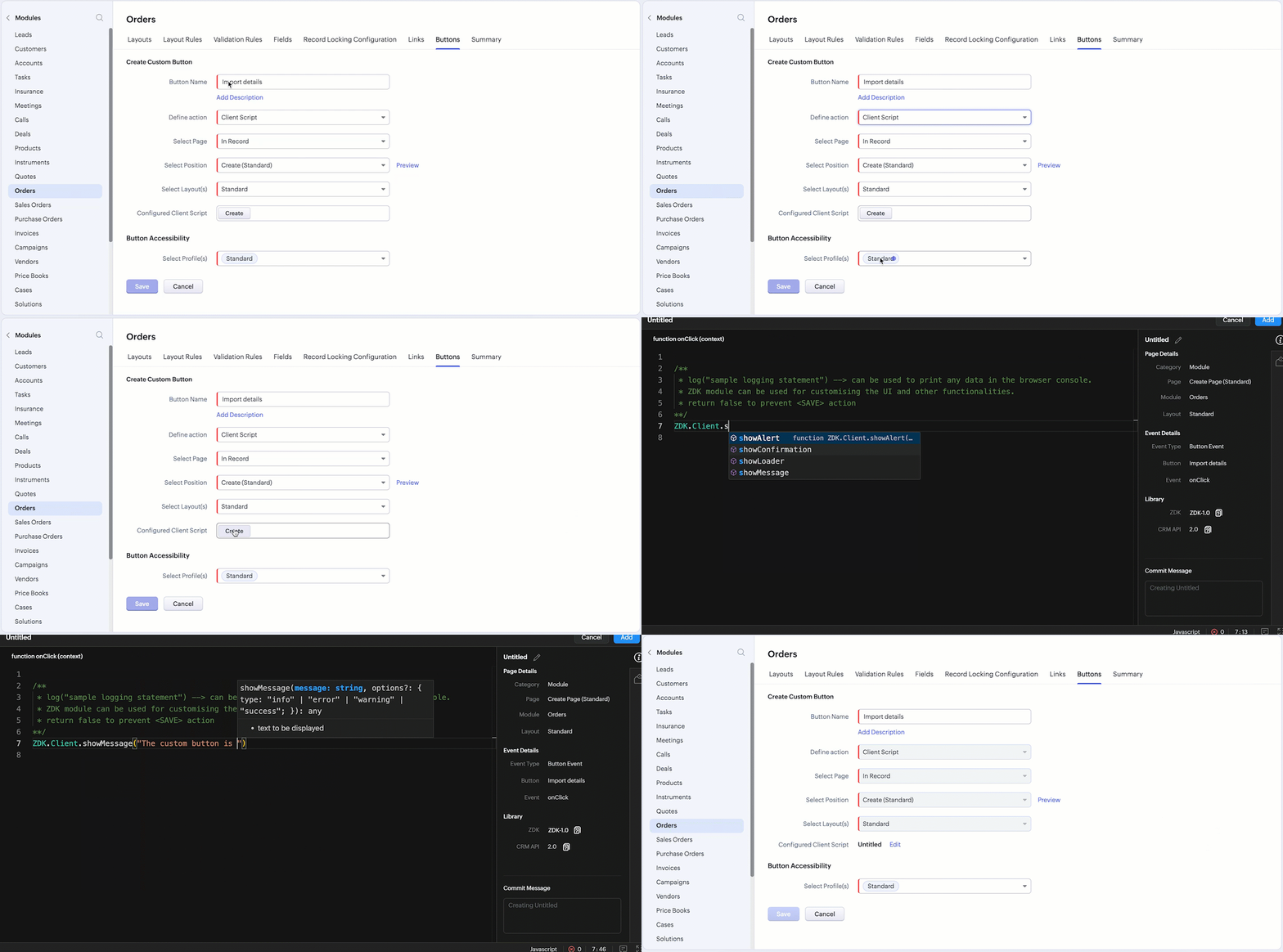
Important Note:
The Client Script linked to the button is saved only after the custom button is saved.
Client Script Configuration Details:
| Setting | Value |
|---|---|
| Event Type | Button |
| Event Name | onClick |
| Argument | context |
The context object varies depending on where the button is placed:
Use Case 1: Add Notes Instantly from List View
Business Problem
Sales teams need to add notes quickly while reviewing multiple records.
Solution
Result
Use Case 2: Import Products from Zoho Sheet into Subform
Business Problem
Sales reps manually enter large product lists into CRM subforms.
Solution
Result
Use Case 3: Send Bulk Emails from Related List
Business Problem
Managers must open each student record to send emails.
Solution
Result
Mobile Support:
Client Script support for custom buttons on Zoho CRM mobile is scheduled for Q3 2025.
Client Script support for Custom Buttons marks a major step toward modern, responsive CRM customization in Zoho.
For businesses using Zoho One, this feature reduces friction, accelerates workflows, and empowers users with contextual actions — all without backend delays.
👉 Read More: